Pick the model. Gemini, Claude, or OpenAI.
The model behind your chat is now your choice. Six presets across Gemini, Anthropic and OpenAI, switchable per message, with the same Skills, tools and integrations on every one.



The model behind your chat is now your choice. Six presets across Gemini, Anthropic and OpenAI live in the composer, and you can switch between them on any turn of any thread.
Same Skills. Same tools. Same integrations. Same attachments. The only thing that changes is which model is doing the thinking on the next message.
The lineup
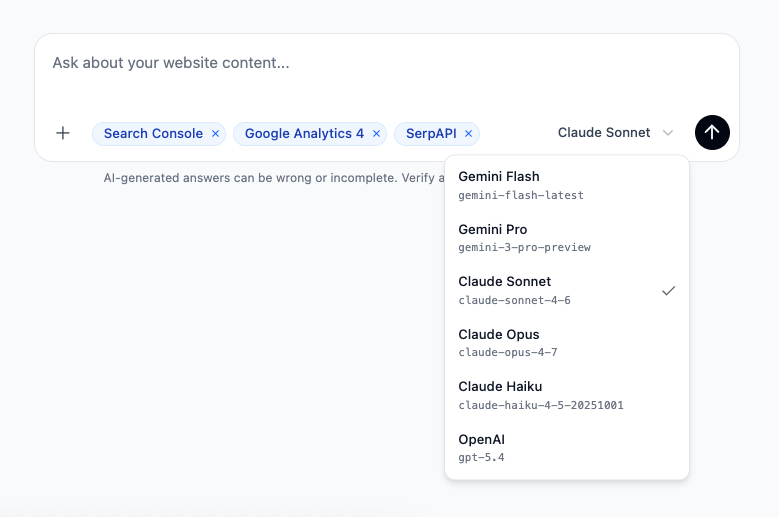
Six presets, three providers, picked so each one earns its slot.
- Gemini Flash. Fast and surprisingly capable on the long-tail content work that fills most days - quick audits, batch reviews, drafting from a brief.
gemini-flash-latest. - Gemini Pro. When Flash needs more headroom. Bigger reasoning, longer outputs, the same Google-grounded posture.
gemini-3-pro-preview. - Claude Sonnet. Anthropic’s editorial workhorse. Best when the output has to read like a person wrote it - refresh briefs, voice-led rewrites, persona-aware structure.
claude-sonnet-4-6. - Claude Opus. The heavy reasoning option. Reach for it on the hardest analysis - decline diagnoses across noisy data, programmatic-template audits, anything where the answer needs to hold up to scrutiny.
claude-opus-4-7. - Claude Haiku. Anthropic at speed. Use it for rapid passes over many pages where you still want the Anthropic tone.
claude-haiku-4-5-20251001. - OpenAI. GPT-5.4 with reasoning on. Strong general-purpose model with the OpenAI flavour - structured extraction, schema work, JSON-shaped outputs.
gpt-5.4.
How it looks in the composer
The picker sits next to the send button. One click, pick a model, send the message. The agent uses that model for that turn. Switch again on the next one if you want.
Why per-message, not per-thread
Real content work is rarely one model’s job from start to finish. A typical session looks more like this:
- Run a fast crawl-grounded audit on Gemini Flash to find the ten pages worth looking at.
- Hand the gnarliest one to Claude Opus for the decline diagnosis - it’s worth the extra time.
- Move to Claude Sonnet to draft the rewrite brief, because that’s where Sonnet’s editorial instincts shine.
- Send the final spec through OpenAI for a structured-output pass against your QA schema.
That whole arc happens in one thread, with the agent carrying the context forward across model switches. You don’t leave the conversation. You just pick the right tool for the next turn.
Same Skills, same tools, every model
Every Skill in your library - the twenty system playbooks and the custom ones you’ve written - runs on every model. Same with the integrations you can toggle in chat: Search Console, GA4 and SerpAPI. The composer’s +menu and source pills don’t change when you switch models.
Attachments work the same way. Drop a brand guideline PDF or a spreadsheet of URLs, switch from Flash to Opus, and the attachment is right there in the next turn.
Credits scale with the model
Different models consume different amounts of credits, the same way every other AI tool prices its tiers. Flash and Haiku are the lightest; Sonnet and Pro sit in the middle; Opus is the heaviest. Pick the model the question deserves; the credit cost reflects what you picked, on a per-turn basis rather than a flat per-thread number.
Try it
The picker is live in every workspace - no toggle, nothing to install. Open Chat, find the model name to the left of the send button, and pick one.
If you’re not sure where to start, run a few routine turns on the lighter models and reach for the heavier ones when an answer needs more thought. Let your own work tell you which models fit which tasks.
If a particular model unlocks something for you - or doesn’t - tell us at hello@morrison.app. The lineup is a starting point, not a fixed menu.
See how Morrison can help
Crawl your site, chat with your content, and run AI-powered workflows at scale.
Browse use cases