Live search data in Chat. And Skills.
Morrison Chat can now reach Google Search Console, GA4, SerpAPI and Ahrefs directly. And Skills – pre-written playbooks you run in Chat – just launched.



Two changes shipped this week. Both are the kind of update you only really feel once you’re inside Chat - but they change what a conversation with Morrison can actually tell you.
In short: Chat can now reach live search, analytics and SERP data directly, and there is a new way to run structured, repeatable audits without prompting from scratch. We call the second one Skills.
Search Console, GA4 and SerpAPI - in the conversation
Morrison has always been grounded in your crawled content. That has been the point: answers tied to your actual pages, with citations. What was missing was the other half of the picture - how those pages are performing in Google, who’s currently outranking you, and which queries are worth the fight.
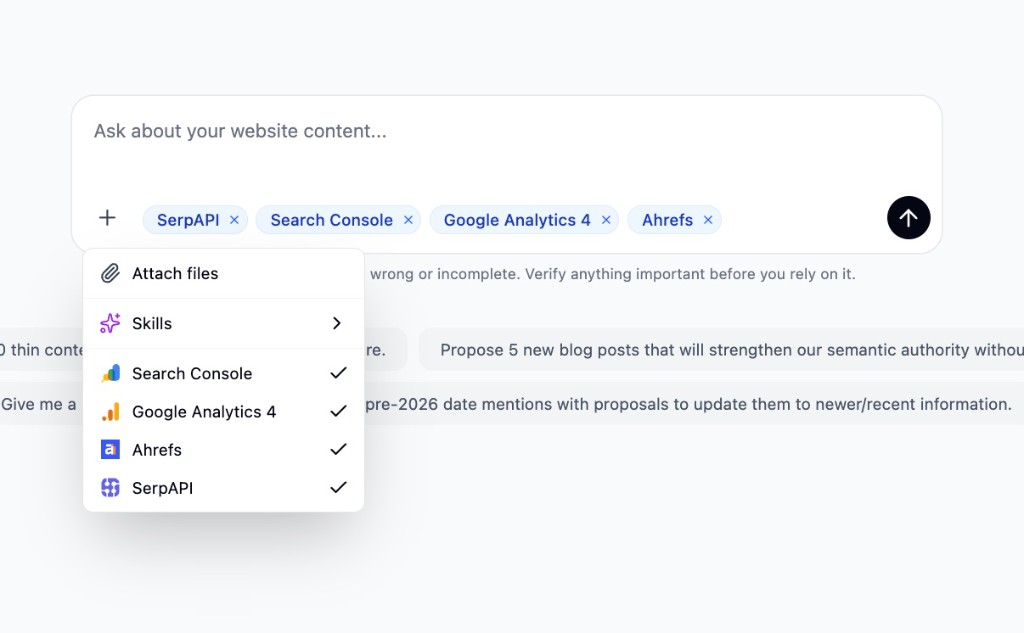
That’s what these three sources bring. You turn them on per conversation from the + menu on the chat composer, and the agent chains them itself.
Search Console
Clicks, impressions, CTR and average position - at the site, page or query level, plus URL Inspection and sitemap reads. The classic move is unglamorous and high-value: pages with high impressions and weak CTR, or queries you’re ranking in positions five to fifteen where a small nudge moves the needle. Read-only - Chat can’t submit sitemaps or change your property.
Google Analytics 4
Sessions, engagement and conversions per page. This is what lets Chat reason about traffic quality, not just visibility. A page can have impressions and clicks and still not contribute to anything the business cares about - GA4 is how that shows up in the conversation. Uses the property you’ve selected on the integration; the model can’t switch it.
SerpAPI
Live SERPs for any query. Top results, featured snippets, People Also Ask, news, shopping. Chat can look up what’s ranking for a given term right now and compare it to your own content - without you leaving the chat window, and without a workflow run. Available to every workspace by default; just toggle it on for the conversation.
What it feels like in use
The reason we built these as first-class sources rather than another set of workflow steps is that you can now ask multi-part questions and let the agent chain the tools itself. A few that work well today:
- “Which blog posts lost the most impressions in the last 90 days, and what’s currently ranking for their top queries?” - GSC for the decline, SerpAPI for the replacements.
- “Find pages with high impressions, below-average CTR and thin content. Prioritise by conversion value.” - GSC for CTR, your crawl for content depth, GA4 for conversions.
- “What are the top three organic results for our priority queries doing that we aren’t, and which of our pages are closest to competing?” - SerpAPI for who’s ranking, your crawl for the comparison.
Connect GSC and GA4 on each website under Website settings → Integrations. Once they’re connected, turn each source on inside a specific conversation from the + menu on the chat composer - that keeps every chat transparent about which data the answer was allowed to touch.
Skills
The second change is smaller on paper and bigger in practice.
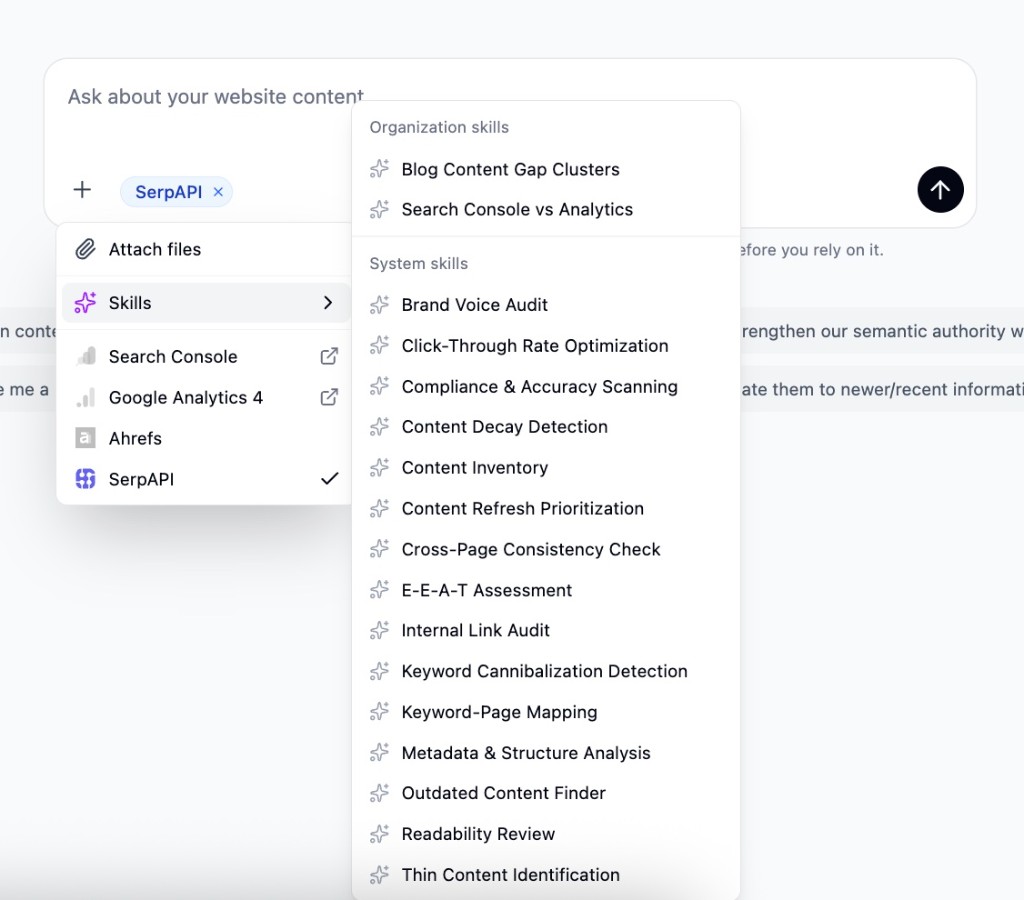
Skills are pre-written playbooks you can run in Chat. Pick one and the agent follows a defined method - with the right tools, in the right order, and an output shaped to be acted on rather than read and forgotten. When a Skill needs Search Console, GA4 or SerpAPI, those sources turn themselves on for the run; you don’t have to remember.
Think of them as the difference between asking an experienced consultant to “have a look at our site” and handing them a checklist. The checklist wins, because it’s the accumulated muscle memory of many audits, written down. Skills are that muscle memory in a form Chat can execute.
The starting library
We’re shipping with fifteen system Skills, built around the audits customers run most often - content inventory, thin content, E-E-A-T assessment, cross-page consistency, readability, metadata, internal linking, compliance scanning, outdated content, keyword cannibalization, content decay, CTR optimization, content refresh prioritisation and keyword–to–page mapping. They’re available to every website, no setup.
Write your own
The ones we ship are examples, not a fixed menu. Any workspace can author custom Skills in the website settings - a title, a short description, the tools the Skill needs, and the playbook body in markdown. There’s an AI assist in the editor that drafts a Skill from a loose description, which is usually how the good ones start.
For agencies this is the part that compounds. Every Skill you write is a process that no longer depends on remembering what to prompt, or on a specific person being the one to do it. Run it on any of your websites in one click.
Try it
Both changes are live for everyone, nothing to turn on globally. Open Chat, open the + menu on the composer, and ask something that would have needed three tabs last week.
If something surprises you in either direction - works unreasonably well, or doesn’t - reply to the email that brought you here, or write to us at hello@morrison.app. We’re reading.
See how Morrison can help
Crawl your site, chat with your content, and run AI-powered workflows at scale.
Browse use cases