Twenty new system Skills. Live in Chat.
Twenty pre-written playbooks for the work content teams do over and over - audits, briefs, refreshes, decline diagnoses and governance gates. All grounded in your crawl, with Search Console, GA4 and SerpAPI on tap.



Twenty new system Skills are live in Chat today. Five buckets, one focused job per Skill, all running on the same crawl plus live data spine: Search Console, GA4, SerpAPI.
Skills are pre-written playbooks for the work content teams do over and over - audits, briefs, refreshes, decline diagnoses, governance gates. You pick one in Chat from the + menu, the agent runs the playbook, you get an output you can act on. No prompt-wrangling, same answer every time, every model.
What changed in this round
The crawl is the substrate. Every Skill leads with what’s actually on your pages, then layers data on top. The result reads more like an experienced editor than a dashboard - “this page’s H1 doesn’t match the intent of the queries it’s catching” rather than “CTR is below benchmark.”
Live data, baked in. Search Console, GA4 and SerpAPI are first-class data sources inside Chat. Each Skill picks the right combination of crawl and live data for its job and chains the calls itself.
One job per Skill, done well. Decline diagnosis is its own Skill; rewriting is another. Topical authority scoring is separate from cluster planning. Voice, originality and compliance are three different gates. The Skills cross-link instead of overloading, which means each one ships a sharper output and the suite chains cleanly.
The twenty new ones
Five buckets, twenty Skills, plain English on each one.
Intelligence - what’s happening in your portfolio
- AI Answer Engine Visibility & Capture Plan. Find which of your priority queries trigger AI Overviews and Perplexity answers, who’s being cited, and which of your pages are closest to being pulled in - with the rewrite angles that would get them there.
- Content Performance Portfolio. Classify every URL into Stars, Workhorses, Question Marks and Dead Weight using traffic and conversion-density - and explain, page by page, why each one sits where it does.
- Page Performance Decline Diagnostician. Pick a page that’s slipping and explain why, by triangulating search performance drops, engagement changes and what’s currently ranking for its top queries.
- Programmatic / Template Quality Auditor. Find the cohort-level patterns where every page in a template is underperforming the same way, so you fix the template instead of fixing pages one at a time.
- Search-Demand × Content-Supply Imbalance Map. Surface the topics where the world is searching and your site has nothing - and the topics where you have ten pages and should have three.
- Topical Authority Score & Cluster Plan. Score where you actually have topical authority today, where you’re close, and where the next cluster build will move the most ground.
Coverage - where the gaps live
- Persona / Buyer-Journey Coverage Map. For each persona × journey stage, show which pages exist, which are weak, and where the journey breaks before conversion.
- Question & FAQ Harvester. Pull every question your audience is asking - from People Also Ask, search queries and your own pages - and map them to the page that should answer each one.
- Search-Intent Mismatch Auditor. Find pages ranking for queries with the wrong intent (informational pages catching commercial queries, or vice versa) and decide per page whether to pivot, split or accept.
- Consolidation, Cannibalization & Pruning Agent. Find duplicate-intent pages, decide what to merge, redirect, rewrite or kill, and produce the migration plan in one output.
- Content Knowledge Map. Give every page a position in your site’s graph - topics, entities, internal links, parent cluster - and surface gaps, drift and orphan pages.
Operations - the systems beneath the content
- Schema & Structured-Data Optimizer. Find missing or invalid schema across the site, prioritise by SERP feature opportunity, and produce ready-to-paste JSON-LD per page or per template.
Creation - briefs and rewrites that ship
- Universal Brief Builder. Draft a full content brief grounded in the live SERP, the existing crawl and your internal linking - structure, entities, questions to answer, internal-link targets and a brand-voice section.
- Content Refresh Brief Builder. For an underperforming page, produce a precise rewrite spec: what to keep, what to cut, what to add, which sections to restructure - tied to the queries it’s leaving on the table.
- Localization Brief Builder. Translate or rebuild a page for a new market with locale-specific search data, regional examples and an editorial line that survives the crossing.
- AI Overview & Snippet Capture Engine. For each priority query, produce the exact rewrite spec a page needs to be eligible for the AI Overview, featured snippet or People Also Ask slot.
Governance - the gate that ships quality
- Brand Voice Guardian. Codify your voice once, then audit any page or batch against it with line-level edits, not vibes.
- Pre-Publish QA Agent. A single-call gate before a page ships: voice, originality, compliance, schema, internal links, metadata, intent. One report, one decision.
- Compliance & Legal Risk Scanner. Surface unsupported claims, regulated-industry slips and missing disclosures, with the exact passages flagged and a suggested rewrite per finding.
- Originality & Internal Contradiction Auditor. Flag generic AI-shaped passages, recycled phrasing across your own pages, and places where two of your pages contradict each other on facts.
A few of them in use
The fastest way to get a feel for the new set is a few real questions. Each of these is one Skill run, one output.
“Why is our pricing page slipping?” - Page Performance Decline Diagnostician. Reads the page, looks at the queries it’s losing, sees what’s currently ranking instead, and tells you whether it’s an intent shift, a content gap, a SERP feature change, or all three. With a recommended next move.
“Where should our next ten articles sit?” - Topical Authority Score & Cluster Plan. Scores where you have topical authority today, where you’re close, and where the next ten articles will move the topic the most - tied to a cluster plan with internal-link targets.
“Are we eligible for the AI Overview on this query?” - AI Overview & Snippet Capture Engine. Shows who’s currently being cited, which of your pages is closest, and the exact rewrite spec to make it eligible.
“Is this page ready to ship?” - Pre-Publish QA Agent. One report covering voice, originality, compliance, schema, internal links, metadata and intent. One report, one decision.
The compounding starts when you chain them. Decline Diagnostician feeds the Refresh Brief Builder feeds Pre-Publish QA. Topical Authority feeds the Universal Brief Builder feeds Pre-Publish QA. You stay in the conversation; the platform handles the chain.
And: privacy on the ones you write
Custom Skills shipped earlier this month. The piece we wanted to add this round is control over who sees and runs each one. Two independent toggles, per skill:
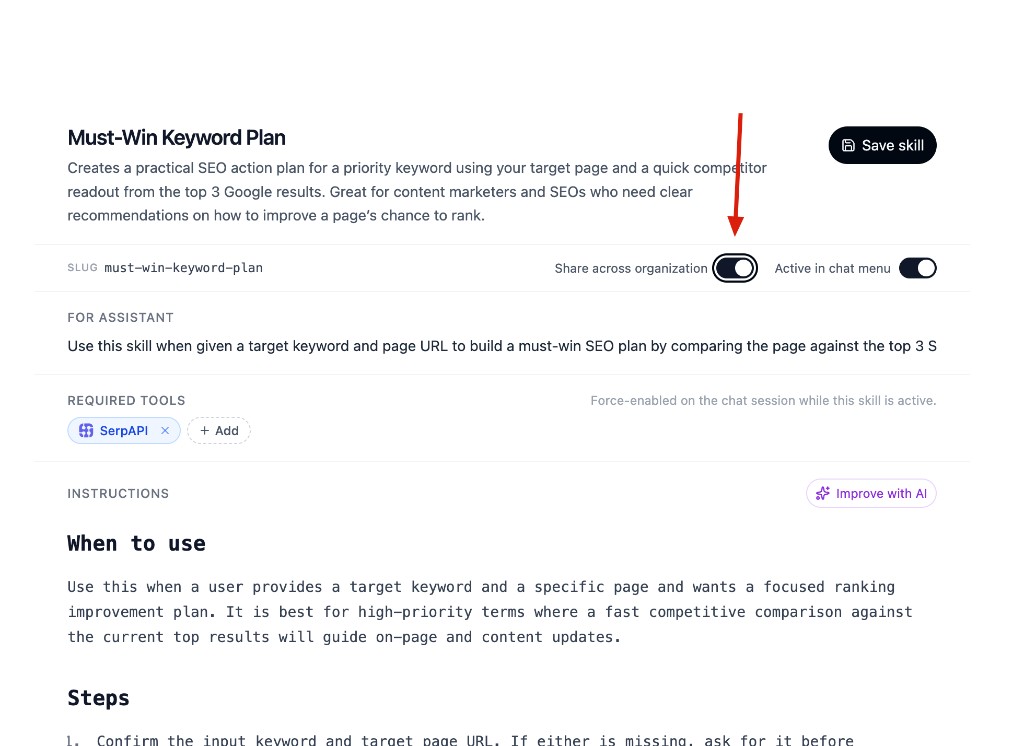
- Share across organization. On, the skill is available to everyone in the workspace. Off, it stays private to you - useful while you’re sharpening a playbook before anyone else runs it.
- Active in chat menu. Independent of who can see it. Controls whether the skill appears in the + menu on the composer or sits in the library until you call for it by name.
Together they cover the way teams actually work with their own playbooks. Draft a brief skill, keep it private for a couple of weeks of sharpening, then flip Share across organization when it’s ready. Decide separately whether it earns a slot in the picker or stays in the library for niche runs. The agent treats org-shared skills exactly like system ones - same picker, same execution, same chaining.
Try them
The new Skills are rolling out to every workspace - no toggle, nothing to install. Open Chat, open the +menu on the composer, and pick the one that matches what’s on your desk today.
If you don’t know where to start, run Content Knowledge Map once. It positions every page in your site’s graph, and most of the other Skills read from that layer.
For the ones you write, the toggles live next to the slug in the Skill editor. Keep them off while you’re iterating; flip Share across organization when the playbook is ready for the team.
If something works unreasonably well, or doesn’t, write to us at hello@morrison.app.
See how Morrison can help
Crawl your site, chat with your content, and run AI-powered workflows at scale.
Browse use cases