Google Ads. Now an integration in Chat.
Google Ads joins Search Console, GA4 and SerpAPI as a first-class source in Morrison Chat. Read-only by design, with the real value in combining it with the rest - paid × organic overlap, landing-page quality scored against spend, paid keyword gap against the live SERP.



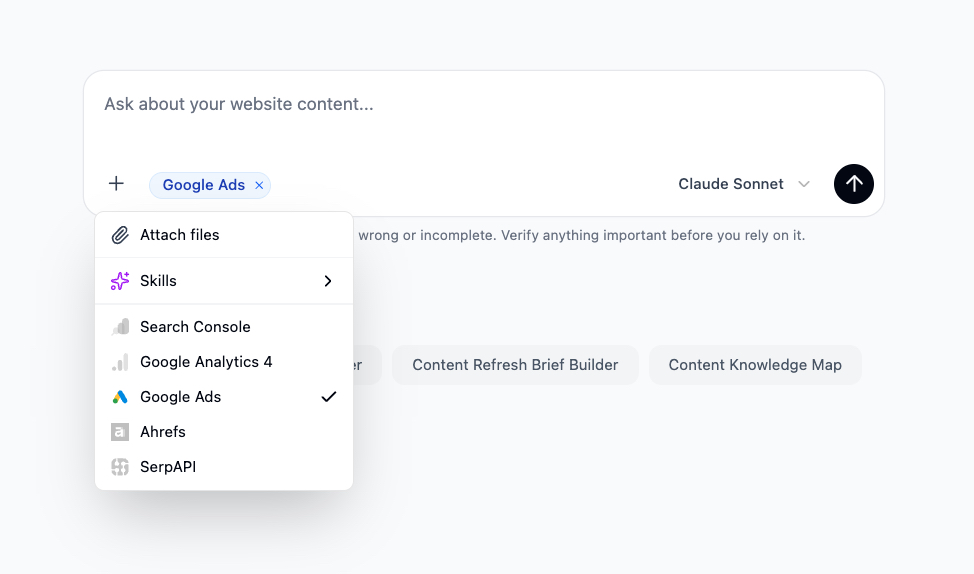
Google Ads is now a source in Morrison Chat. Connect once on the website, then turn it on per conversation from the + menu. Read-only by design - the agent can read the account, never change it.
Morrison is built around understanding your content and your website, and how people find them on the web. Google Ads is one of the richest signals on that second half. Adding it as a first-class source means a Chat answer can now combine what your pages say, who’s landing on them, what they search for to get there, and what you’re paying to put in front of them - in a single answer.
What it can read
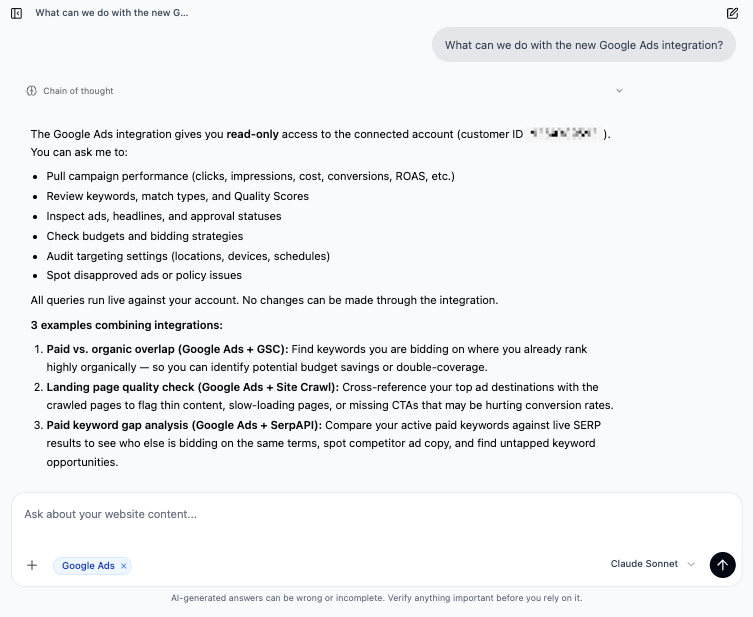
The integration runs against the Google Ads account you connect on each website. Customer ID is shown on the integration and on every answer that uses the source, so it’s always clear which account is in play. From there, Chat can:
- Pull campaign performance - clicks, impressions, cost, conversions, ROAS, conversion rate, CPC, per campaign, ad group, ad or keyword, across any window.
- Review keywords, match types and Quality Scores for any campaign or account-wide.
- Inspect ads, headlines and approval statuses - including disapprovals and policy issues.
- Read budgets and bidding strategies on every campaign, with the actual spend pacing against budget.
- Audit targeting settings- locations, devices, schedules, audiences - and surface where the settings disagree with what’s converting.
All of it is live. No exports, no sheet refresh. And no writes: Chat can’t change a bid, pause a campaign or fix a disapproval on your behalf - it tells you what to do, you do it inside Google Ads.
The point: combining it with the rest
On its own a Google Ads question is useful, the way a Google Ads dashboard is useful. The reason this integration earns its place in Morrison is what it lets the agent do alongside your crawl, Search Console, GA4 and SerpAPI in the same answer.
Paid × organic overlap
Pull the keywords you’re actively bidding on, cross them with Search Console for the same window, and surface the ones where you already rank in the top three organically. That cohort is usually the first place a paid budget gets trimmed - you’re paying for clicks you would have got anyway. Same analysis can run inverted: organic queries you should be defending with paid because the SERP is hostile.
Landing page quality, scored against spend
Take the URLs your campaigns send traffic to, look them up in the crawl, and rank them by spend against a quality bar. Thin content, slow-loading templates, missing CTAs, broken canonicals on top-spending destinations - these are the cheapest conversion wins on the site, because the traffic is already paid for. Until now this involved a CSV from Ads, a crawl tool and a spreadsheet. Now it’s one Chat answer.
Paid keyword gap against the live SERP
Compare the keywords you’re bidding on against live SERP results from SerpAPI. Who else is on the auction. What ad copy they’re running. Which keywords have a thin paid SERP worth attacking, and which are crowded enough that organic is the only sensible play. The same combination surfaces keywords competitors are bidding on that you’re missing entirely.
Skills that get sharper
A few of the system Skills get noticeably better with Google Ads on. Page Performance Decline Diagnostician can now rule out (or in) a paid-traffic shift as part of a decline story. Search-Demand × Content-Supply Imbalance Map can weight demand by what’s already commercially priced on the auction. AI Overview & Snippet Capture Engine can prioritise queries by the cost of replacing the click with organic. None of this requires a new Skill - the existing ones pick up the source automatically when it’s on.
Connecting it
On any website, go to Website settings → Integrations and connect the Google Ads account you want available in Chat. The OAuth scope is read-only; you can revoke at any time from the same page or from your Google account. Once it’s connected, turn it on inside a specific conversation from the + menu - same model as Search Console, GA4 and SerpAPI.
Try it
Live for every workspace. Open Chat, flip the Google Ads chip on, and ask something that would have needed three tools yesterday. A reasonable first prompt: “Which keywords am I bidding on where we already rank in the top three organically?” - then take it from there.
If something works unreasonably well, or doesn’t, write to us at hello@morrison.app.
See how Morrison can help
Crawl your site, chat with your content, and run AI-powered workflows at scale.
Browse use cases